Friday, November 16, 2007
Vista and Java continued
So, after I took the time to debug my issues, it just started working. I don't know what caused it to happen but it works now. I have no idea.


Thursday, November 15, 2007
Vista and Java
I got a new laptop at work and it has Vista on it. I decided to give it a go for work. After a month, I'm starting to get really irritated. I'm not going to digress too much here. What I really want to bring up is the networking in Vista. If you run "ipconfig /all" in Vista you get a list of 15 items, but in XP SP2, you only get what makes sense. You get the physical adapters and thats it. But my problem is more directly related to the what multicast packets get handled. I'm working a piece of test code that I'll probably post later. It basically creates a thread to list to a socket set to listen for multicast packets on a specific group and port. Then a second thread is created to send 8 packets out to that group and port. In Vista, the packets are never recieved but in XP they are. I discovered this because it also doesn't work in JmDNS. The Java implementation of multicast DNS uses that exact technique and it fails to work on Vista, but works on XP. I don't want to have to install XP just do work, but if I can't figure this out, then I'll have to go "backwards." I'll post the code later.
Tuesday, November 13, 2007
Upgrades - more
I think I've decided that first I need to do something with the case that I have now. There are some problems with it anyway. First, the CPU is really hot. Like 72 degrees C hot! Second, its pretty old and was made before there were Pentium 2 processors so it doesn't have the cooling capacity anyway for a hotter processor. Three, it doesn't have proper ports on the back. The last mainboard I had didn't have ports that lined up so I tossed the back panel piece. I did make some upgrades to this case that make me happy. I cut an Autobot symbol in to the side of the case, and then I glued a thin piece of plexiglas in to it as a window. The glass is painted with a red glitter paint that is mostly translucent. I'll post a picture later. I also painted the entire case a nice color of glossy royal blue. I think it looks kind of cool myself, but it is bigger than I need for the mATX board. Maybe I should think about a new case before bother with the SGI mods.
Monday, November 12, 2007
Upgrades?
I've started researching a little to move my current PC into a "new" case. I have an SGI Indy case with a dead Indy in it. I'd like to move my PC into it because I like the look of the case. I know that sounds like sacrilege but the SGI is dead so what else could I do with it anyway. I haven't decided for sure that I want to that yet, but I'm seriously considering it. I have to figure out how to cool the CPU. Right now, its really under-cooled in the case I'm using now. Partly that is because I'm impatient and cheap. The case is easily 10 years old and never really had enough cooling before anyway. There's only one case fan in it and then the retail AMD Athlon 64 CPU cooling fan attached. I need something better if the case is going to be much shorter. It looks as though the cooler needs to be less than 55mm from the mainboard to the top of the cooler to fit in the case. The power supply can be a 1U unit I think. That should be plenty small enough to replace the supply in the case now. I'll need a PCIexpress16 90 degree riser card to fit the video in it. That doesn't have to happen right away. There is a built-in card on the board, but the nVidia 7600 GT is nicer. Then I just need to accommodate the TV tuner some way. I think I'll also cut out the entire back panel and replace it with a thin sheet of copper to make cutting the holes for the ports on the back much easier. I'm sure that none of the current holes will be in the right place anyway. This is just a brainstorming thing right now. I need to gut the old SGI out first. I might save the guts only because I don't remember what about the system made it dead. I think it may have been a combination of things but I'm pretty sure that the power supply was the last problem and the most expensive to fix.
Sunday, November 11, 2007
Love Canal?
I became curious when I was watching the History Channel this morning. They did a little shpiel about the Love Canal. Of course at the first commercial break I decided to go read the Wikipedia article about it. The first few lines talk about how the Board of Education basically forced Hooker Chemical to sell the land to them. I thought to myself, why would that be? That sounds ridiculous. Luckily there is a footnote that takes you to the referring article.
After reading half of the article, I thought how could this be? That can't be right. How can a totally innocent company be so vilified? Then I finished the article and I started to realize that, although there are a lot of facts in the article, the overt bias against the rest of the world really gets to me by the end. A company produced a bunch of chemical waste and then just buries it in the ground. Then decades later, the chemicals are killing and maiming people. The primary point that the countpoint article seems to miss is that although the company managed to get wording into the deed that absolves them of responsibility, it was still the primary creator of the toxic chemicals in that dumpsite. It should have cleaned up the mess first before selling the land. I want to agree with the author, but the condescending atitude that paints the attacks on the rest of the world really push me back to the popular conclusion that Hooker is responsible and should have to clean up the mess. The Google local view is pretty interesting.
After reading half of the article, I thought how could this be? That can't be right. How can a totally innocent company be so vilified? Then I finished the article and I started to realize that, although there are a lot of facts in the article, the overt bias against the rest of the world really gets to me by the end. A company produced a bunch of chemical waste and then just buries it in the ground. Then decades later, the chemicals are killing and maiming people. The primary point that the countpoint article seems to miss is that although the company managed to get wording into the deed that absolves them of responsibility, it was still the primary creator of the toxic chemicals in that dumpsite. It should have cleaned up the mess first before selling the land. I want to agree with the author, but the condescending atitude that paints the attacks on the rest of the world really push me back to the popular conclusion that Hooker is responsible and should have to clean up the mess. The Google local view is pretty interesting.
Thursday, July 26, 2007
Core 6 for a while.
In general things that Ubuntu didn't have down pat, RedHat seemed to manage. The two biggest things were the Common Access Card support, and for me, the ability to actually get SameTime installed. I used RedHat for a while. Its still installed, but I'm not using it right now. The last straw was when the installed version of Eclipse deleted all of my .CVS directories from my source folder. Its happened in the Windows version too, but only to files checked out from the branch. This was a mainline check out and I was ticked. I switched back to Windows for now. I'm going to go back to Redhat soon, but I have software to finish. I liked the experience in Linux better for the most part, but I don't have time to be fixing problems like that right now. The major draw back to it is that now that the CVS information is gone, I have to learn how to move just the modified files out of the source directory so that I can do a new check out. Too much time for now. I know how to do it in Windows.
Saturday, April 28, 2007
Ubuntu out
Ubuntu looked awesome and mostly things worked. But in the months since I pretty much stopped using it, I found that a different distribution is doing more work to help out on the smart card front. I switched to Fedora Core 6.
The primary motivation is that my smart card compiled library stopped working everywhere and the new recommendation was to use CoolKey from fedora. I suffered through a pile of I-don't-what-version-it-is problems and finally got to the point of having the library detect the smart card. Nothing I did made the smart card actually work with Firefox again. Then I was tempted by the smart card login idea. I never got that work either. The last straw for Ubuntu was installing the Lotus SameTime 7.5 client. It was an RPM and it refused to install because of missing dependencies. I couldn't figure out why, although the dependencies were there, it wouldn't install. ...then the Ubuntu color of yellow/brown/orange started getting to me.
I installed FC6 and appreciated the blue-ness. CoolKey worked out of the box. All I did was install the Firefox plug in for DOD. Its a huge time saver. Also, I think I may have had to install the CoolKey security device myself, but that was easy. Magic, and then the smart card worked. Then I tackled the smart card login. Everything was already installed for it as well, except for the Root certificate authority certificates. I needed to install the ones that correlated to the smart card I was using. Then I just followed the instructions that I'll have to post here later since I can't remember them. Then it just worked with the USB reader.
The primary motivation is that my smart card compiled library stopped working everywhere and the new recommendation was to use CoolKey from fedora. I suffered through a pile of I-don't-what-version-it-is problems and finally got to the point of having the library detect the smart card. Nothing I did made the smart card actually work with Firefox again. Then I was tempted by the smart card login idea. I never got that work either. The last straw for Ubuntu was installing the Lotus SameTime 7.5 client. It was an RPM and it refused to install because of missing dependencies. I couldn't figure out why, although the dependencies were there, it wouldn't install. ...then the Ubuntu color of yellow/brown/orange started getting to me.
I installed FC6 and appreciated the blue-ness. CoolKey worked out of the box. All I did was install the Firefox plug in for DOD. Its a huge time saver. Also, I think I may have had to install the CoolKey security device myself, but that was easy. Magic, and then the smart card worked. Then I tackled the smart card login. Everything was already installed for it as well, except for the Root certificate authority certificates. I needed to install the ones that correlated to the smart card I was using. Then I just followed the instructions that I'll have to post here later since I can't remember them. Then it just worked with the USB reader.
Saturday, December 02, 2006
Ubuntu continued.
I've recently resurrected my desire to continue using Ubuntu at work mostly because of the insane security policies that have been enacted. We have actually been pushed to the point of absolutely having to write down our passwords because of the size, the randomness, and frequency of required change. Its truly a pain and no one is acting like they even notice the human side of the problem. Anyway, I digress. I upgraded 6.06 to 6.10 so that I could play with some of the new stuff. The only problems I've noticed from the upgrade was the hitch with the fglx ATI graphics driver not being used after upgrade. It was a minor glitch, easily fixed. I just used the instructions to reinstall it. As it turned out though, the only thing I needed to to was reenable it in the x.org configuration file. So after continued use, I see three problems that I'd really like to see fixed or find a way to fix them myself.
First: Sound isn't working from zsnes. I know it isn't a big deal, but it works in Windows just fine, but if it worked here. It would be so nice. Sound is produced but its noisy and sounds clipped. I searched for solutions for about 30 minutes, but I haven't given it more time than that yet.
Second: Every time I go from home to work and back again, the network adapters need to be brought up and then down. At work I'm wired and at home I'm wireless with WPA. I suspect my WPA solution is the problem, but I'm not annoyed enough about it to do anything right now. I just sudo ifdown eth0 or eth1 and then sudo ifup eth0 or eth1 depending on where I am. As long as I remember to turn the radio back on at home, it works all of the time when I do that.
Third: Inserting an external USB mouse permanently disables the touchpad until reboot. That is super annoying. After a little research, I've heard that it is because of the fglx ATI driver, but I really want the accelerated 3D support so I need that driver. I read somewhere about how to re-enable the touchpad manually, but I haven't gotten to it yet.
Basically, other than that stuff, I haven't given up using ubuntu yet. Its still pretty good.
More later...
First: Sound isn't working from zsnes. I know it isn't a big deal, but it works in Windows just fine, but if it worked here. It would be so nice. Sound is produced but its noisy and sounds clipped. I searched for solutions for about 30 minutes, but I haven't given it more time than that yet.
Second: Every time I go from home to work and back again, the network adapters need to be brought up and then down. At work I'm wired and at home I'm wireless with WPA. I suspect my WPA solution is the problem, but I'm not annoyed enough about it to do anything right now. I just sudo ifdown eth0 or eth1 and then sudo ifup eth0 or eth1 depending on where I am. As long as I remember to turn the radio back on at home, it works all of the time when I do that.
Third: Inserting an external USB mouse permanently disables the touchpad until reboot. That is super annoying. After a little research, I've heard that it is because of the fglx ATI driver, but I really want the accelerated 3D support so I need that driver. I read somewhere about how to re-enable the touchpad manually, but I haven't gotten to it yet.
Basically, other than that stuff, I haven't given up using ubuntu yet. Its still pretty good.
More later...
Thursday, November 09, 2006
ACM PD
I recently discovered that the professional development center at ACM contains a Safari library. I realize that I should have known this. Another guy at work pointed it out. Its like my bookshelf now has 20 slots. 10 for normal use and then the ACM one that has 10 more and they are greatest hits. I say this because the ACM Safari is limited to something like 500 of the 1000s of books available at the full Safari. The books are selected by ACM members as the best books in the field I think. The biggest downside is that you can't download PDFs to read offline. But since its included as part of an ACM membership, I can't complain.
Sunday, October 29, 2006
long time
I guess I've been lax about posting here. I don't really have a good reason except that I've been posting about 360.yahoo.com too and I keep thinking that I'll try to keep this blog to more a technical nature, but I'm finding that I don't have much to say in a technical blog right now. I'm working on it. I'm thinking. I'm thinking a lot right now. :)
Saturday, September 23, 2006
Nike+iPod stuff
Well, I've definitely been way from this a while. I've been toying with 360.yahoo.com as well.
I have had a Nike+iPod kit and a refurb iPod nano for about a month now. I really like it and I've figured out a few things. First, you don't need Nike+ shoes to use it, but they help. Second, the sensor needs to be right side up in your shoes when you run, or it will fail to update distance properly at all. Third, calibration fails if the distance is too far off and that will happen if the sensor is upside down. Also, Lance Armstrong will occasionally make announces congratulating you on accomplishments. For example, I recently ran 10 miles and he congratulated me for completing my longest workout to date.
Its cool to play with and it movitates me to run more just so I can see updates on the website.
I have had a Nike+iPod kit and a refurb iPod nano for about a month now. I really like it and I've figured out a few things. First, you don't need Nike+ shoes to use it, but they help. Second, the sensor needs to be right side up in your shoes when you run, or it will fail to update distance properly at all. Third, calibration fails if the distance is too far off and that will happen if the sensor is upside down. Also, Lance Armstrong will occasionally make announces congratulating you on accomplishments. For example, I recently ran 10 miles and he congratulated me for completing my longest workout to date.
Its cool to play with and it movitates me to run more just so I can see updates on the website.
Saturday, August 12, 2006
Update on Ubuntu
Well, as it turns out my linux adventure is on hold. I used Ubuntu for a least two whole weeks at work and I've discovered a few things that I don't like.
Since I mostly do java development, I really want to use Eclipse. Eclipse on windows is very easy for me. I've been using it for at least a year and half now. I got used to everything that was different from other IDEs and I liked it. On linux, it is a little bit different. My biggest complaint and what would likely keep me from using it further on linux is that the user interface has too much empty space. It feels like I can see much more code on my laptop in windows than in linux. That is the primary annoyance there. It sounds petty, but it is enough for me to reconsider using it. If I hadn't used the windows version, I'm sure that it would be fine.
The other aspect is that at work, we have to use smart cards to log in now. Linux users are excepted right now, so we don't have to login with smart cards, but we are totally locked out of email without the use of a windows box. That gets quite annoying too. I managed to get the card working in Firefox so that I could access work websites finally, but I'm still tempted with fiddling around instead of doing real work.
That turns out to be my biggest linux complaint. Its almost too open for me because I can't control myself and do work. Instead I feel compelled to figure how change this or update that. Why isn't this working? and Oh, I finally figured that out. I am keeping it aroung and trying to login once a week. I'll give it another try in a few weeks. Its just right now we have big deadlines and linux isn't platform we need to deliver. That sounds silly I suppose, but its just taking me a really long time to get happy with the way everything works. Since it is a work computer, that time investment is totally unjustified.
I'm going to try to stay mostly computer oriented here for now I think. We'll see how it goes.
Since I mostly do java development, I really want to use Eclipse. Eclipse on windows is very easy for me. I've been using it for at least a year and half now. I got used to everything that was different from other IDEs and I liked it. On linux, it is a little bit different. My biggest complaint and what would likely keep me from using it further on linux is that the user interface has too much empty space. It feels like I can see much more code on my laptop in windows than in linux. That is the primary annoyance there. It sounds petty, but it is enough for me to reconsider using it. If I hadn't used the windows version, I'm sure that it would be fine.
The other aspect is that at work, we have to use smart cards to log in now. Linux users are excepted right now, so we don't have to login with smart cards, but we are totally locked out of email without the use of a windows box. That gets quite annoying too. I managed to get the card working in Firefox so that I could access work websites finally, but I'm still tempted with fiddling around instead of doing real work.
That turns out to be my biggest linux complaint. Its almost too open for me because I can't control myself and do work. Instead I feel compelled to figure how change this or update that. Why isn't this working? and Oh, I finally figured that out. I am keeping it aroung and trying to login once a week. I'll give it another try in a few weeks. Its just right now we have big deadlines and linux isn't platform we need to deliver. That sounds silly I suppose, but its just taking me a really long time to get happy with the way everything works. Since it is a work computer, that time investment is totally unjustified.
I'm going to try to stay mostly computer oriented here for now I think. We'll see how it goes.
Saturday, July 01, 2006
Ubuntu adventures
Well, there are two things...
First, I spent a long time on getting the wireless connection active. The biggest problem seems to be that with WPA enabled and using a Intel Centrino 2200 wireless connection, the default Ubuntu 6.06 installer is a little confused. The card itself works right out of the box and the wireless connection was there, but it wouldn't connect to my network because I had WPA-PSK enabled. As it turns out, the biggest trick was that you have to make absolutely certain that the ssid that you type in is exactly the same "case" as the actual ssid value. Also, even though Windows calls the information you enter a password to connect to the network with WPA, the wpa_supplicant calls it a passphrase.
The solution I used was to make changes to my /etc/network/interfaces file. My wireless card was called eth1.
The file already contained...
auto eth1
iface eth1 inet dhcp
..and then I added immediately below it...
wpa-ssid
wpa-passphrase
Then I did an sudo ifdown eth1
Then sudo ifup eth1 and done.
Yes, I'm aware that this ins't the most secure or flexible option, but it works for me now. I'll investigate further when it becomes a problem later, like at a public open AP. :)
Secondly, I made my machine a dual boot (it even works with Windows Vista beta 2) with Ubuntu 6.06 and a version of windows. The simplest thing to do is, with a blank harddrive, install windows into only one partition by making at least two partitions before you choose to install windows. Make sure that the second partition is big enough for the linux install. Install windows. Then install linux into the other partition. The safest thing for me was to manually partition the second partition into swap and home and root. Once installed and booted into, then make a backup of your /boot/grub/menu.lst file. Then sudo vi /boot/grub/menu.lst file and add the windows installation into the list using the example in the file as a guideline and uncommenting the hiddenmenu option. You might also want to increase the delay to 5 seconds or more, just in case you forget about it the next time. Then save the file.
The next time you reboot, if you edited the menu.lst file properly, should show Windows in your list of choices. At least for Vista beta2, the windows bootloader couldn't find c:\windows\boot\winloader.exe anymore, so I used the install CD for Windows to repair it. After the repair, the computer can now boot in to either OS just fine.
Eventually, I'll add this stuff to the Ubuntu wiki, but I lazily didn't feel like taking the time.
First, I spent a long time on getting the wireless connection active. The biggest problem seems to be that with WPA enabled and using a Intel Centrino 2200 wireless connection, the default Ubuntu 6.06 installer is a little confused. The card itself works right out of the box and the wireless connection was there, but it wouldn't connect to my network because I had WPA-PSK enabled. As it turns out, the biggest trick was that you have to make absolutely certain that the ssid that you type in is exactly the same "case" as the actual ssid value. Also, even though Windows calls the information you enter a password to connect to the network with WPA, the wpa_supplicant calls it a passphrase.
The solution I used was to make changes to my /etc/network/interfaces file. My wireless card was called eth1.
The file already contained...
auto eth1
iface eth1 inet dhcp
..and then I added immediately below it...
wpa-ssid
wpa-passphrase
Then I did an sudo ifdown eth1
Then sudo ifup eth1 and done.
Yes, I'm aware that this ins't the most secure or flexible option, but it works for me now. I'll investigate further when it becomes a problem later, like at a public open AP. :)
Secondly, I made my machine a dual boot (it even works with Windows Vista beta 2) with Ubuntu 6.06 and a version of windows. The simplest thing to do is, with a blank harddrive, install windows into only one partition by making at least two partitions before you choose to install windows. Make sure that the second partition is big enough for the linux install. Install windows. Then install linux into the other partition. The safest thing for me was to manually partition the second partition into swap and home and root. Once installed and booted into, then make a backup of your /boot/grub/menu.lst file. Then sudo vi /boot/grub/menu.lst file and add the windows installation into the list using the example in the file as a guideline and uncommenting the hiddenmenu option. You might also want to increase the delay to 5 seconds or more, just in case you forget about it the next time. Then save the file.
The next time you reboot, if you edited the menu.lst file properly, should show Windows in your list of choices. At least for Vista beta2, the windows bootloader couldn't find c:\windows\boot\winloader.exe anymore, so I used the install CD for Windows to repair it. After the repair, the computer can now boot in to either OS just fine.
Eventually, I'll add this stuff to the Ubuntu wiki, but I lazily didn't feel like taking the time.
Sunday, May 14, 2006
FreeNAS
Paul and I (well mostly Paul since he's the one who wanted to use it) spent some time on Saturday exploring setting up FreeNAS on an older P2/333 machine so that he could use it as a NAS box. FreeNAS is a FreeBSD distribution that has a minimal interface and OS service set to support just file sharing and configuration of shares. It seems to work pretty well now. We had a couple of concerns about the filesystems and the installation and stuff, but he now has a NAS box with about 130GB of storage in it. The issues we had were just a few things. First, with the latest release image, the CDROM drive in his computer wasn't detected properly. It sounds like that shouldn't be a problem except that since the CD was detected, the installation aborted. We went back a few releases to 0.6.0 and that version seems to be working just fine. NTFS doesn't work with the installation as a read/write filesystem. He tried to reformated to FAT and FAT32 but the OS complained that the disk was too large. Its for the better anyway because FAT32 isn't a very efficient format for large disks. He ended up formatting UFS instead. That worked just fine. Then he setup CIFS so that Windows could see the drives as shares.
Monday, May 08, 2006
More photos
I put an album of the ocho rios, jamaica part of our honeymoon up so that I could see them from the Tivo. So the Yahoo Photo stuff I like because of Tivo access, but I like flickr because I like its interface better.
Sunday, May 07, 2006
Some photos that are available.
I think I'm going to go with flickr. I started with trying picasa which is how I ended up here. It worked, but not as I expected. So I tried Yahoo photo. You can see some of the photos I posted here.
Then I tried flickr, which is apparently owned by Yahoo anyway, and I think I like it. Here are the photos, but you'll have to join, I think to see the photos because I didn't want them publicly indexed.
Then I tried flickr, which is apparently owned by Yahoo anyway, and I think I like it. Here are the photos, but you'll have to join, I think to see the photos because I didn't want them publicly indexed.
Saturday, May 06, 2006
a 4 picture limit?
That's interesting. Maybe I'll give something else a try. I definitely didn't look in to this too far, so maybe I'm just doing something wrong. Whatever.
The Chandler
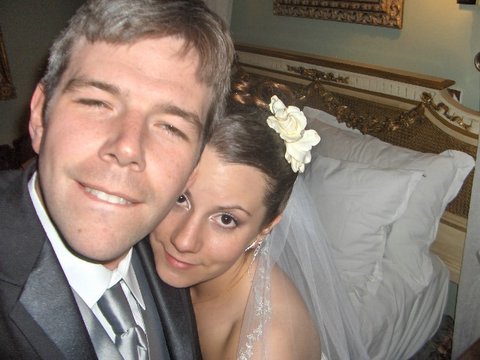 We couldn't believe the room that we were staying in, so we tried to get a picture of us in the room. ...And then we went nuts taking pictures. The room was amazing!
 The hotel prepared a chilled bottle of champagne for us...
 They turned down the bed and set out robes for us to use...
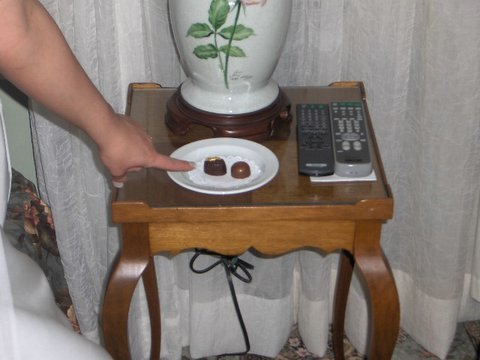 We even had fancy chocolates to eat.
Back from the honeymoon...
Since the idea here was for me to post some pictures from our honeymoon and our wedding, i'll try giving that a shot.
First Post!!!
Its really deep, isn't it? I just thought of slashdot as I typed it. I really just created this to make it possible to share picasa photos.
Subscribe to:
Posts (Atom)